
What is a Contact Form? Expert Tips on Converting Passive Visitors into Active Engagement


Stuart Bontrager
A B2B website is not just a place to educate and store information. It must invite action. Whether someone wants to ask a question, explore your offerings, or connect with a salesperson, a contact form helps bridge the gap between initial interest and active engagement.
When set up correctly, a contact form helps unify fragmented lead sources into an integrated sales engine. But how many businesses are actually getting the most out of theirs? In this post, we’ll go over:
- What are contact forms on websites?
- How does a contact form work?
- 6 contact form UI best practices

B2B Marketing Strategy Framework: The Ultimate Guide to Business Branding
Get a more detailed view of the complete buyer’s journey with our downloadable guide.
What are contact forms on websites?
A contact form is a structured web page element that allows visitors to leave messages to the website owner or team. At its core, a contact form helps push prospects further down the buyer’s journey, as it allows for subsequent follow-ups from the sales and marketing teams.
For more complex websites, a contact form acts as a receptionist; they are always ready to route messages to the right person to address the inquiry. B2B forms need to provide the following functions:
- Capture inbound interest from the moment of expressed interest
- Eliminate friction from the sales and marketing outreach process
- Provide a consistent and accessible way to collect lead information
- Serve as a direct line between your audience and your team members
Now that we know what a contact form is, let’s outline how it works.

Subscribe to EBQ's Bimonthly Newsletter
Subscribe to EBQ's Bimonthly Newsletter
How does a contact form work?
The automated mechanics behind a contact form can be simplified into five steps:
Step 1: The visitor leaves a message
A visitor can complete a digital form to contact the website owner and leave behind their name and email address for follow-ups. The website’s front-end code then captures their answers.
Step 2: The data is sent to the web server
As soon as the visitor submits the form, its data gets sent to your server using an HTTP POST request.
Step 3: The server-side script processes the form submission
A few of these scripts include PHP and Python. This is how the form data gets “translated” back to legible information for a team member to read.
Step 4: The organization gets notified of the form submission
How the organization is alerted ultimately depends on how the contact form was set up. Often, the form’s answers are emailed to designated team members.
EBQ Tip
To help you stay organized, we recommend using a sales prospect list. This allows you to unify contact information, track where each lead came from, log follow-up activity, and ensure no inquiry falls through the cracks — all in one place.

Download the Sales Prospect List Template
Utilize our sales prospect list template to start finding the right leads that fit your ideal customer profile.
Step 5: The visitor receives a confirmation message
Ideally, the visitor receives a confirmation message as soon as they submit their form. Sometimes, this could look like a redirect to a “Thank You” landing page. By closing the loop, the visitor knows that the organization has received their message.
As you can imagine, introducing contact forms to your website can also quickly invite dirty data to clog up your database system.
To help keep your contact data clean, we recommend implementing:
- Validation rules, such as marking required fields and correcting data formatting before form submission
- Spam protection by leveraging CAPTCHA or honeypot fields
- CRM integration that automates the lead creation and workflow triggers
6 contact form UI best practices
Just as you need to make sure the contact form is set up correctly, you also need to entice people to fill it out as well. A confusing, cluttered, or poorly performing form will send visitors away without clicking anything. So, here’s what separates a high-converting contact form from one that gets ignored.
Keep it short and focused
It may be tempting to ask a lot of information up front, but each additional field reduces the likelihood of someone submitting the form. Keep in mind that your BDRs can always ask discovery questions during their first follow-up.
So, you should only ask just enough questions to help your business development reps (BDRs) and your marketing team follow up with the visitor.
Generally speaking, every B2B contact form asks for:
- First Name
- Last Name
- Email Address
- Phone Number
- Company Website
- Message
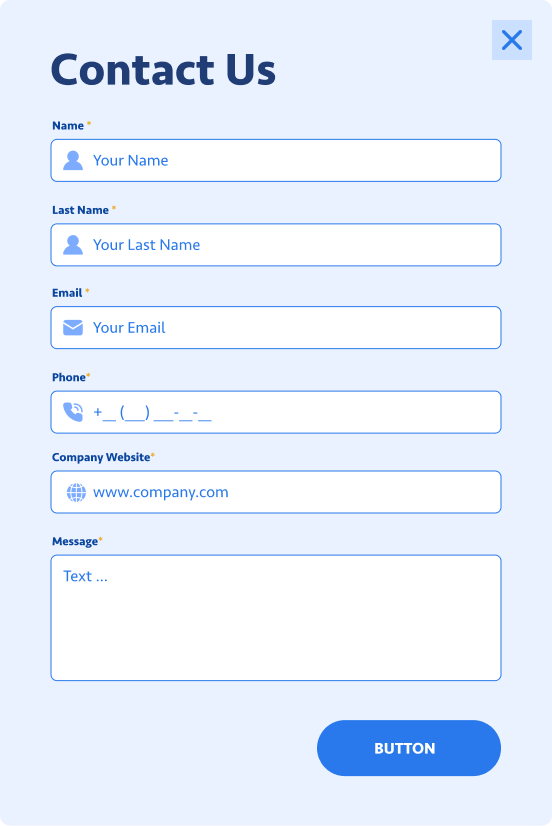
Write clear, user-friendly labels
Using visible labels above each field makes it clear and easy for users to understand what information you’re looking for. We also recommend simplifying the language to make your brand feel warmer and more approachable. For example, “Your Name” beats “Full Legal Name.”
Make the submit button obvious
Remember: the goal is to compel a form submission. Your call-to-action button should stand out visually and use action-oriented language that inspires the next action, such as “Let’s Talk” or “Get In Touch”. We recommend using a contrasting color that draws the eye without clashing with your brand palette.
Optimize for mobile
Given that search engines often operate on a mobile-first approach, a lot of site traffic comes from mobile. Make sure you test the responsiveness of your contact form layout on desktops, tablets, and mobile devices. Make sure you use large tap targets, single-column layouts, and use appropriate input types so mobile keyboards are triggered automatically.
Match your brand guidelines
A contact form that does not match your brand guidelines can come across as you not paying attention to the details. Custom styling makes your form feel like a more natural part of your website experience. For an example step-by-step walkthrough, see our guide on “How to Make a Custom Pardot Form with CSS Styling.”
B2B Marketing Strategy Framework: The Ultimate Guide to Business Branding
Get a more detailed view of the complete buyer’s journey with our downloadable guide.
Why build strong web contact forms
At first glance, a contact form is a deceptively simple tool to extract information from site visitors. But, if set up correctly, a well-crafted contact form is a powerful revenue driver. After all, the businesses that take contact forms seriously are the ones that convert casual site visitors into loyal customers.
Ready to turn your website into a lead generation machine? EBQ’s certified marketers can help you maximize conversions through thoughtfully designed assets. Our team integrates with yours to build robust marketing programs that fill pipelines and drive real revenue growth.
About the Author:
Stuart is one of EBQ’s Revenue Consultants with over 20 years of experience in Sales. His tenure as the VP of Sales sharpened his expertise in translating business visions into lead-generation tactics.