
7 B2B Marketing Dashboards Examples Every Marketer Needs to Know

Stuart Bontrager
B2B marketing takes finesse and strategy — which can only be possible with data. It’s why 83% of marketers say data-driven marketing is vital for growth, with 76% increasing analytics investment. By leveraging these 7 B2B marketing dashboards, you get a 360˚ view of your marketing campaigns to make better, data-driven decisions:
- Marketing executive dashboard
- Marketing deliverables dashboard
- SEO and website optimization dashboard
- Email marketing dashboard
- Social media dashboard
- PPC dashboard
- Content marketing dashboard

B2B Marketing Strategy Framework: The Ultimate Guide to Business Branding
Learn how to build a strong brand experience with our downloadable guide.
What are marketing dashboards?
A marketing dashboard is a collection of reports and metrics that tell a story of how your team has been performing over a given period of time. You can build a dashboard that drills down to one campaign’s performance or even get a comprehensive high-level view of how marketing influences your revenue operations.
Dashboards are typically found within tools like Google Analytics, CRM platforms, marketing automation software, or business intelligence tools, making them easily accessible to both marketing and executive stakeholders. You can build a dashboard that drills down into a single campaign’s performance or provides a comprehensive, high-level view of how marketing influences revenue operations.
All in all, these dashboards allow you to organize otherwise siloed data to surface insights and next action items.
How to build your B2B marketing dashboards
To start, understand what kind of tools are available to you. Here’s a table to help you evaluate which tool is best for you:
| Type | Amount of Investment | Example | Best for |
|---|---|---|---|
| Native free tools | Low (time investment only) |
|
Businesses that have just started tracking channel-specific performance |
| SEO Tools | Moderate to high |
|
Marketing teams managing ongoing SEO, content, and competitor research |
| Marketing analytics platforms | Moderate to high |
|
Businesses that are tying marketing activity to pipeline and revenue metrics |
| Custom analytic stacks | Variable |
|
Organizations that require more tailored reporting and cross-channel visibility |
1. Understand why you're building a dashboard
Just like any other marketing project, you should always focus on who might be accessing these dashboards and what questions they’d like answered. A few of these questions could be:
- How well did that email perform?
- How many leads did my marketing campaigns create?
- How has this project performed month-over-month?
- Has my site’s rebrand been successful?
- Is my content drawing in organic leads?
As a general rule of thumb, your dashboard should have a maximum of 1-3 key focuses to ensure you’re not over-cluttering your dashboard with irrelevant information.
2. Identify which data points can answer your question
Even if you haven’t invested in pay-to-play platforms, there are still many robust free marketing tools that can give you the data you need to answer your questions, such as Google Analytics and Meta Business Suite. Make sure you understand what data you have access to that can address your stakeholders’ needs.
Make sure a few of these metrics and reports show long-term progress. For example, if you are going to include a report that shows the total number of MQLs generated monthly, we recommend that you also include a report that showcases a trendline over the past 12 months to showcase progress.
3. Keep the design clean and focused
Now that you’ve identified which graphics and metrics to include, it’s time to design your dashboard. Your objective is to show development and not clutter your dashboard with irrelevant information.
A few of our other tips include:
- Keep the most impactful metrics at the top of your dashboard
- Experiment with graph layouts, such as donut charts and line graphs
- Ensure all data is properly annotated with its source
- Adding benchmarks to showcase the effectiveness of your marketing campaigns so far
- Regularly reviewing and pruning metrics that are irrelevant to your dashboard’s purpose

Subscribe to EBQ's Bimonthly Newsletter
7 practical marketing dashboard examples
Keep in mind that these seven examples are, by no means, the only marketing dashboards you can create. That said, these dashboards are a great starting point for organizations to track their campaign performance.
1. Marketing executive dashboard

Purpose of the dashboard: To provide high-level visibility into marketing’s impact on revenue operations by tracking MQL performance, lead quality, and revenue contribution
Who might read this report: Executives and RevOps leaders
What reports/metrics to include:
- Total Number of MQLs: How many marketing-qualified leads (MQLs) your team has generated over the month
- MQL to SQL conversion rate: How many MQLs became sales-qualified leads (SQLs) and got pushed down further in the sales funnel
- MQLs to Revenue: How many marketing leads directly contributed to the overall revenue cycle for the month
- Lead Sources: Where your MQLs came from, such as a specific gated content piece or an outbound cold calling campaign
- Cost per MQL: How much it costs to acquire each MQL
2. Marketing deliverables dashboard

Purpose of the dashboard: To give stakeholders and management clear visibility into marketing execution progress, ownership, timelines, and resource utilization.
Who might read this report: Project managers, marketing professionals, stakeholders
What reports/metrics to include:
- Number of deliverables submitted: How many assets did the specialist or the team turn in for approvals
- Number of deliverables approved: How many assets have been approved by the stakeholders
- Number of deliverables roadblocked: How many assets are bottlenecked by stakeholders
- Upcoming milestones and future project timelines: Other than just listing out future initiatives, this allows your leaders to shift priorities before the team starts on their next tasks
- Total time spent per deliverable: Not all projects are created the same, so tracking how long each asset takes to complete allows you to better plan for the future
- Workload capacity per team member: This allows your leaders to set realistic deadlines and expectations by accommodating your team’s current workload
3. SEO and website dashboard

Purpose of the dashboard: To monitor overall site performance, including site visibility, average engagement time, and conversion rate.
Who might read this report: Stakeholders, content marketers, SEO teams, web developers, marketing leaders
What reports/metrics to include:
- Traffic acquisition by channel: How visitors found your site — whether that’s from organic search, direct URL input, referrals, or paid ads
- Organic traffic trends: How search competitive your site and pages are
- Top landing pages: Which pages are drawing in the most traffic
- Average engagement time: How long a user spent on your website
- Bounce rate: The percentage of users who click out of your site after visiting one page
- Event counts: How many users performed a conversion action, such as submitting a contact form
- Keyword rankings and visibility trends: What keywords you are currently ranking for, and how visible your pages are on search engines
- Indexed pages and technical health indicators: What technical elements on your site are preventing spiders from efficiently crawling your site
- Core Web Vitals metrics: How fast and efficiently your site is loading, which is a confirmed page ranking factor for Google
4. Email marketing dashboard
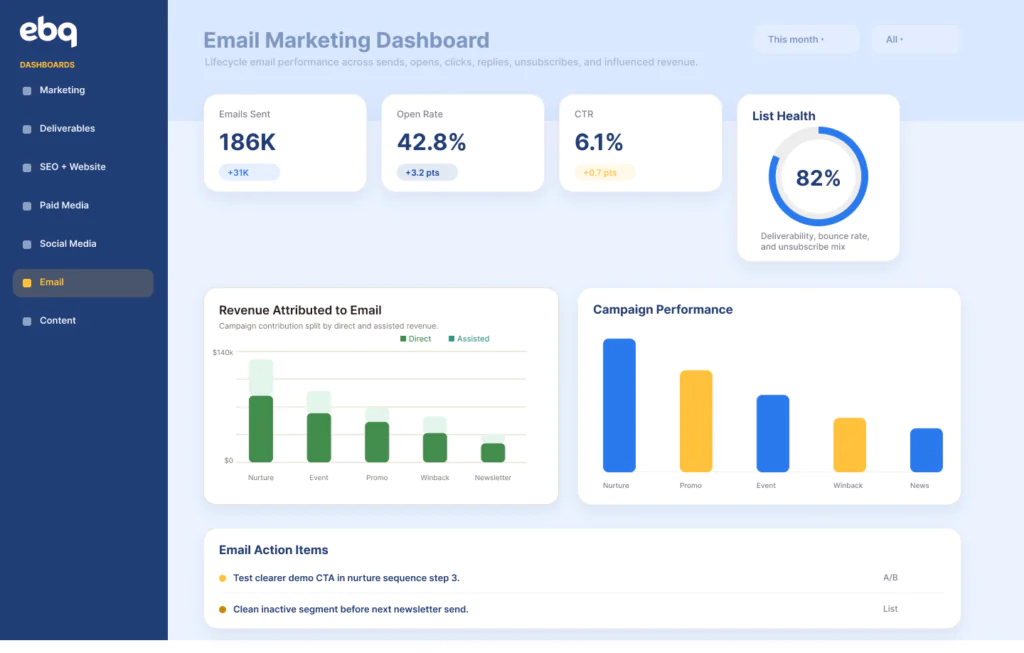
Purpose of the dashboard: To evaluate the performance of email campaigns and automations across the funnel, including engagement, lead progression, and revenue influence.
Who might read this report: Marketing leaders, lifecycle marketers, RevOps teams, stakeholders
What reports/metrics to include:
- Number of emails sent: How many emails did your marketing team send over the month?
- Bounces: How many emails were unable to be delivered
- Open rate: How many users opened the email
- Click-through rate (CTR): How many users clicked on a link within your email
- List growth: How has your audience list grown over time
- Total unsubscribe rate: How many people have requested to be taken off the recipient list after receiving your email
- Overall performance by email type: Different emails have different goals, so you should track how each type of email has been performing (newsletter, nurture, transactional, operational).
5. Social media dashboard
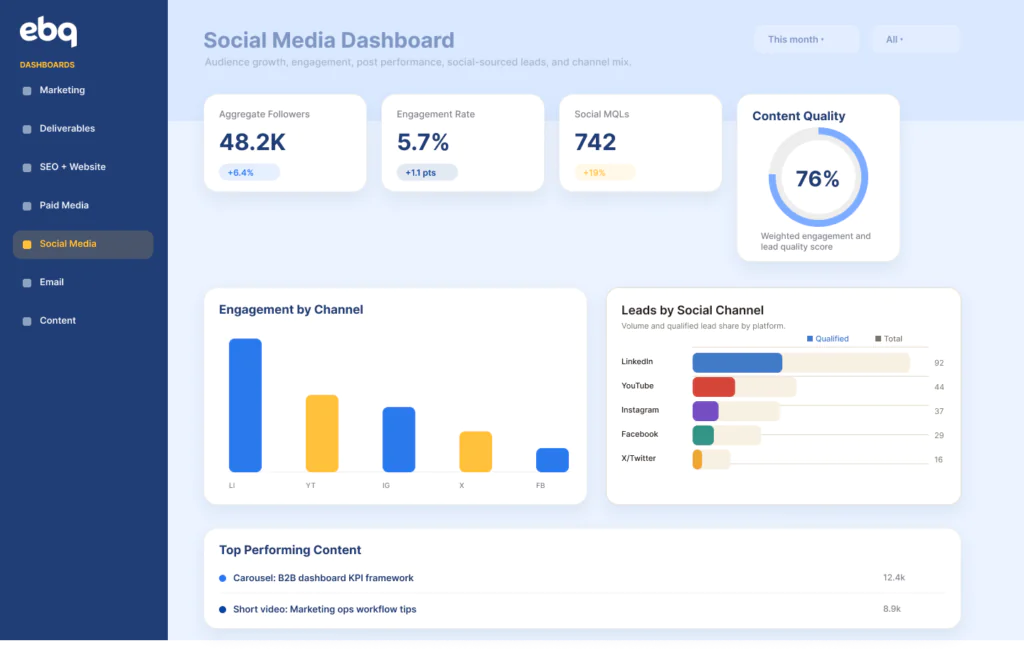
Purpose of the dashboard: To measure brand visibility, engagement, and traffic generated from social media channels.
Who might read this report: Marketing leaders, social media managers, brand teams, stakeholders
What reports/metrics to include:
- Follower growth by platform: How many followers have you gained from each channel (i.e., Facebook, X, LinkedIn, Instagram, etc)
- Engagement rate: Out of how many people that have seen your post, what is the percentage of users that have interacted with your post (such as liking or commenting)
- Reach and impressions: How many people have been exposed to your content
- Clicks to your website: How many people have clicked on your website link from your social media content
- Top-performing posts: Which posts have people engaged with the most over the past month
6. PPC dashboard

Purpose of the dashboard: To track paid media performance and assess return on ad spend across campaigns and platforms.
Who might read this report: Marketing leaders, performance marketers, finance teams, stakeholders
What reports/metrics to include:
- Total ad spend: How much money have you spent on ads this month
- Impressions: How many people have been exposed to your content
- Click-through rate (CTR): How many people have clicked on a link within your ad
- Cost per click (CPC): How much it costs your organization when someone clicks on the ad
- Return on Ad Spend (ROAS): The revenue generated for every dollar spent on ads
7. Content marketing dashboard

Purpose of the dashboard: To evaluate how content contributes to traffic growth, engagement, lead generation, and revenue.
Who might read this report: Content marketers, SEO teams, marketing leaders, stakeholders
What reports/metrics to include:
- Content published by type: How many content assets were published each month (such as blogs, guides, landing pages, and case studies)
- Average engagement time: The average amount of time a user spent reading your page
- Organic traffic by content piece: How many site visitors found your website from your content
- Top-performing content: Which pages have been drawing in the most traffic from your site
B2B Marketing Strategy Framework: The Ultimate Guide to Business Branding
Learn how to build a strong brand experience with our downloadable guide.
Track your marketing performance today
Dashboards are more than just a collection of reports. They provide priceless insights that can help everyone, from executives to specialists, track their current progress and assess overall performance. But understanding the metrics in your B2B marketing dashboards is the first step; the next is using those insights to drive real, measurable growth.
If you’re ready to move past simply reporting data to actively leveraging it for a more effective, revenue-generating marketing strategy, partner with EBQ. We not only translate data into actionable insights, but we also leverage these insights to execute full-scale marketing campaigns that amplify your sales messaging.
About the Author:
Stuart is one of EBQ’s Revenue Consultants with over 20 years of experience in Sales. His tenure as the VP of Sales sharpened his expertise in translating business visions into lead-generation tactics.